Extending DynamoDB-mock
Get the source Luke
$ hg clone ssh://hg@bitbucket.org/Ludia/dynamodb-mock
$ pip install nose nosexcover coverage mock webtest boto
$ python setup.py develop
$ nosetests # --no-skip to run boto integration tests too
Folder structure
DynamoDB-Mock
+-- ddbmock
|   +-- database    => request engine
|   |   `-- storage => storage backend
|   +-- operations  => each DynamoDB operation has a route here
|   +-- router      => entry-points logic
|   `-- validators  => request syntax validation middleware
+-- docs
|   `-- pages
`-- tests
    +-- unit        => mainly details and corner cases tests
    `-- functional
        +-- boto    => main/extensive tests
        `-- pyramid => just make sure that all methods are supported
Request flow: the big picture
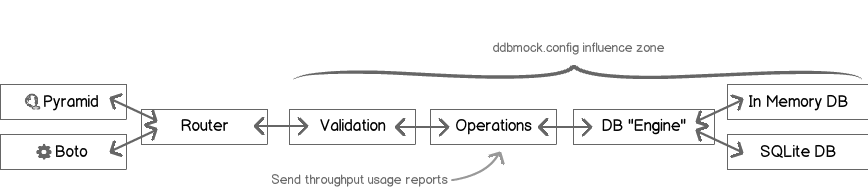
Global request flow
Just a couple of comments here:
- The
routerrelies on introspection to find the validators (if any)- The
routerrelies on introspection to find the routes- The
database enginerelies on introspection to find the configured storage backend- There is a “catch all” in the router that maps to DynamoDB internal server error
Adding a custom action
As long as the method follows DynamoDB request structure, it is mostly a matter of
adding a file to ddbmock/routes with the following conventions:
- file_name: “underscore” version of the camel case method name.
- function_name: file_name.
- argument: parsed post payload.
- return: response dict.
Example: adding a HelloWorld method:
# -*- coding: utf-8 -*-
# module: ddbmock.routes.hello_world.py

def hello_world(post):
    return {
        'Hello': 'World'
    }
If the post of your method contains TableName, you may auto-load the
corresponding table this way:
# -*- coding: utf-8 -*-
# module: ddbmock.routes.hello_world.py

from ddbmock.utils import load_table

@load_table
def hello_world(post):
    return {
        'Hello': 'World'
    }
Adding a validator
Let’s say you want to let your new HelloWorld greet someone in particular,
you will want to add an argument to the request.
Example: simplest way to add support for an argument:
# -*- coding: utf-8 -*-
# module: ddbmock.routes.hello_world.py

def hello_world(post):
    return {
        'Hello': 'World (and "{you}" too!)'.format(you=post['Name'])
    }
Wanna test it?
>>> curl -d '{"Name": "chuck"}' -H 'x-amz-target: DynamoDB_custom.HelloWorld' localhost:6543
{'Hello': 'World (and "chuck" too!)'}
But this is most likely to crash the server if ‘Name’ is not in Post. This is
where Voluptuous comes.
In ddbmock, all you need to do to enable automatic validations is to add a file
with the underscore name in ddbmock.validators. It must contain a post
member with the rules.
Example: HelloWorld validator for HelloWorld method:
# -*- coding: utf-8 -*-
# module: ddbmock.validators.hello_world.py

post = {
    u'Name': unicode,
}
Done !
Adding a storage backend
Storage backends lives in ‘ddbmock/database/storage’. There are currently two of them built-in. Basic “in-memory” (default) and “sqlite” to add persistence.
As for the methods, storage backends follow conventions to keep the code lean
- they must be in
ddbmock.database.storagemodule - they must implement
Storeclass following this outline
# -*- coding: utf-8 -*-

# in case you need to load configuration constants
from ddbmock import config

# the name can *not* be changed.
class Store(object):
    def __init__(self, name):
        """ Initialize the in-memory store
        :param name: Table name.
        """
        # TODO

    def truncate(self):
        """Perform a full table cleanup. Might be a good idea in tests :)"""
        # TODO

    def __getitem__(self, (hash_key, range_key)):
        """Get item at (``hash_key``, ``range_key``) or the dict at ``hash_key`` if
        ``range_key``  is None.

        :param key: (``hash_key``, ``range_key``) Tuple. If ``range_key`` is None, all keys under ``hash_key`` are returned
        :return: Item or item dict

        :raise: KeyError
        """
        # TODO

    def __setitem__(self, (hash_key, range_key), item):
        """Set the item at (``hash_key``, ``range_key``). Both keys must be
        defined and valid. By convention, ``range_key`` may be ``False`` to
        indicate a ``hash_key`` only key.

        :param key: (``hash_key``, ``range_key``) Tuple.
        :param item: the actual ``Item`` data structure to store
        """
        # TODO

    def __delitem__(self, (hash_key, range_key)):
        """Delete item at key (``hash_key``, ``range_key``)

        :raises: KeyError if not found
        """
        # TODO

    def __iter__(self):
        """ Iterate all over the table, abstracting the ``hash_key`` and
        ``range_key`` complexity. Mostly used for ``Scan`` implementation.
        """
        # TODO
As an example, I recommend to study “memory.py” implementation. It is pretty straight-forward and well commented. You get the whole package for only 63 lines :)